What was at stake
Apple taking the payment is not the same as the reader getting access.
GoodBarber builds thousands of iOS apps from one engine. An app owner can sell subscriptions: a reader pays, and premium articles, videos, or pages unlock.
Apple handles the payment, but Apple does not know which content a subscription opens, or whether the reader has an account. The GoodBarber server knows. So the app must never unlock anything just because Apple says the payment went through. It waits for the server.
My responsibility — the subscription service. I designed the service that every screen relies on, and built its StoreKit, server, and identity parts. Teammates built the subscription page and the locked-content screens on top of it.
One service, one question
Every screen asks the same question: which access levels does this reader have? One shared service answers it. No screen reads Apple’s payment data itself, and access levels only ever come from the GoodBarber server.

1. Show only what Apple can sell
Each app owner chooses which subscriptions to sell, in what order, and writes the text of the subscription page. When the app starts, the service asks the App Store for the matching products.
A subscription the App Store does not return is left out, so the page never shows an offer that cannot be bought. The owner’s order is kept: the order of the App Store’s answer does not matter.
take the subscriptions the app owner chose, in the owner's orderask the App Store for the matching productsfor each subscription: if the App Store returned it: keep it otherwise: leave it outThe page only knows each offer’s identifier. It asks the service for the App Store’s translated title, price, billing period, and free-trial length, and places them into the text the owner wrote. Which content a subscription unlocks is not known on the phone at all: that link lives on the server.
2. Know who is buying
A reader can subscribe with an account, or without one.
- With an account, the app first asks the server whether this Apple ID already holds a subscription that can move to the account, for example one bought earlier without an account. If so, the app moves it instead of charging again.
- Without an account, nothing is needed before paying. After the payment, the server exchanges Apple’s receipt (Apple’s proof of purchase) for an anonymous identity and its access levels. The app saves both on the phone, so access survives a restart. On a new phone, “Restore purchase” brings the subscription back, still without an account.
When a reader who subscribed without an account logs in later, the app asks whether to transfer the subscription to that account. App owners can also require an account right after subscribing: the reader is invited to log in or sign up, and the subscription moves to the account.
3. Let Apple take the payment
Before handing over to Apple, the service checks that this iPhone is allowed to make payments, and refuses to start a second payment while one is still running. In apps for children, or when the reader is under age, a simple parental gate comes first. Then Apple’s own sheet takes over.
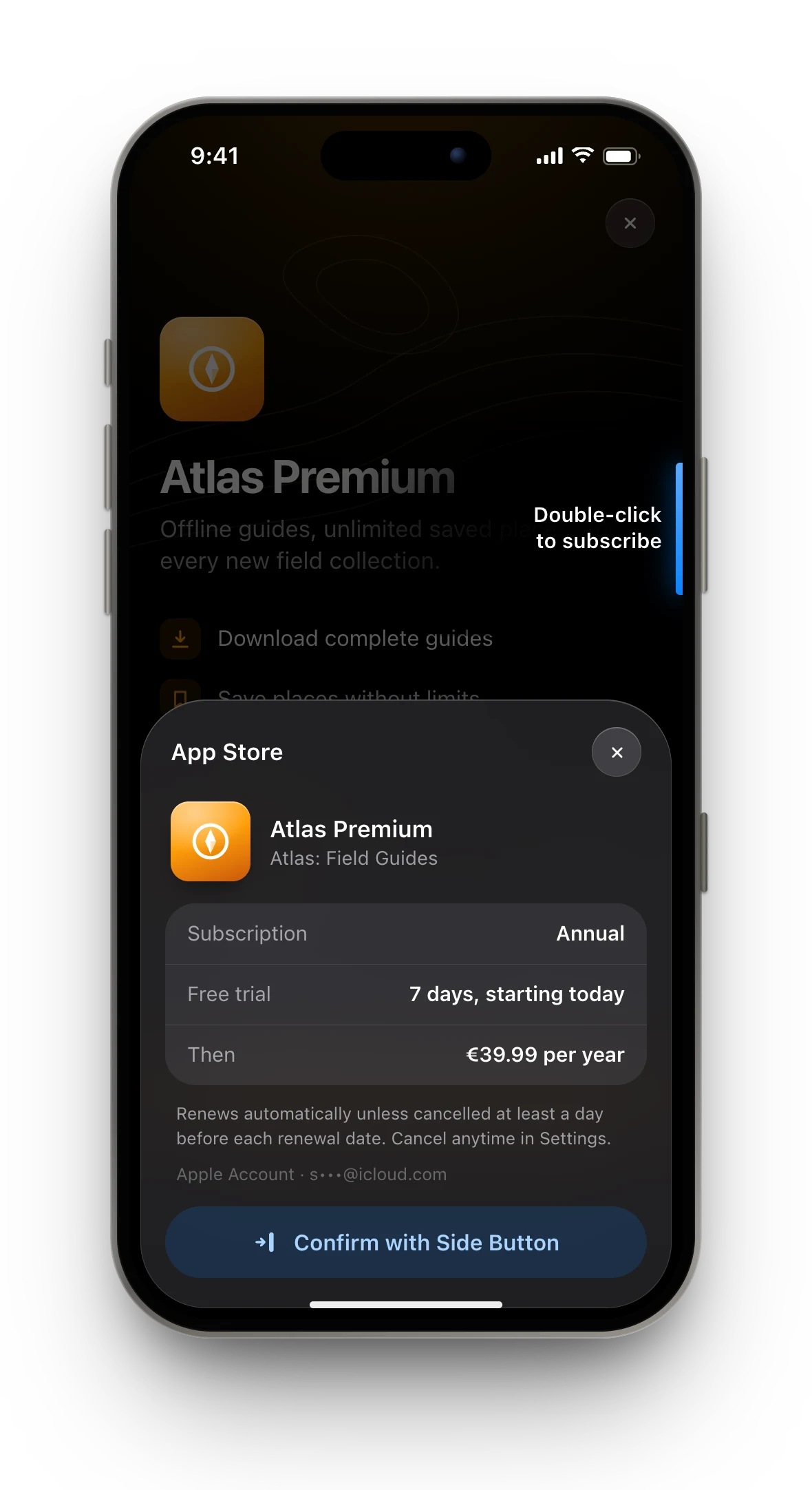
The payment belongs to Apple. What happens before and after it belongs to the app.
The code that listens to Apple’s payment updates starts when the app launches and keeps listening for the whole session, not only while the subscription page is open.
when Apple reports a payment update: if it is still processing, or waiting for a parent's approval: keep waiting if it is paid: tell Apple the payment is handled, then continue the purchase if it failed or was cancelled: tell Apple, and stop without showing a technical error4. Let the server decide
After the payment, the app sends Apple’s receipt to the GoodBarber server, together with the reader’s identity. The server checks the receipt and decides which access levels the reader now has. The app then reloads the account, or saves the new anonymous identity. Only then does anything unlock, and only then does the subscription page close.
decide who will own the purchase: the account, or an anonymous identity created after payingif the reader is signed in and this Apple ID already holds a subscription the account can take: move it to the account, reload the account, and stopask Apple to take the paymentsend Apple's receipt and the reader's identity to the serverreload the account, or save the anonymous identity and its access levelsclose the subscription pageIf Apple’s receipt is missing from the phone when a signed-in reader buys or anyone restores, the app asks Apple for a fresh one. Only one request goes out: anyone else who needs the receipt waits for that same answer.
5. Unlock the same access everywhere
When the access levels change, the whole app hears about it at once.
- Restricted content compares the levels it requires with the reader’s. The free feed only carries a preview; the full version is fetched with the reader’s identity and kept on the phone per access level. When a reader loses a level, the full versions kept for it are deleted.
- Ads disappear for subscribers when the app owner turned that option on.
- The subscription page is for people who have not subscribed. A subscriber who taps “Subscribe” lands on their profile instead, where “Manage my subscription” opens Apple’s settings if the subscription was bought on an iPhone.
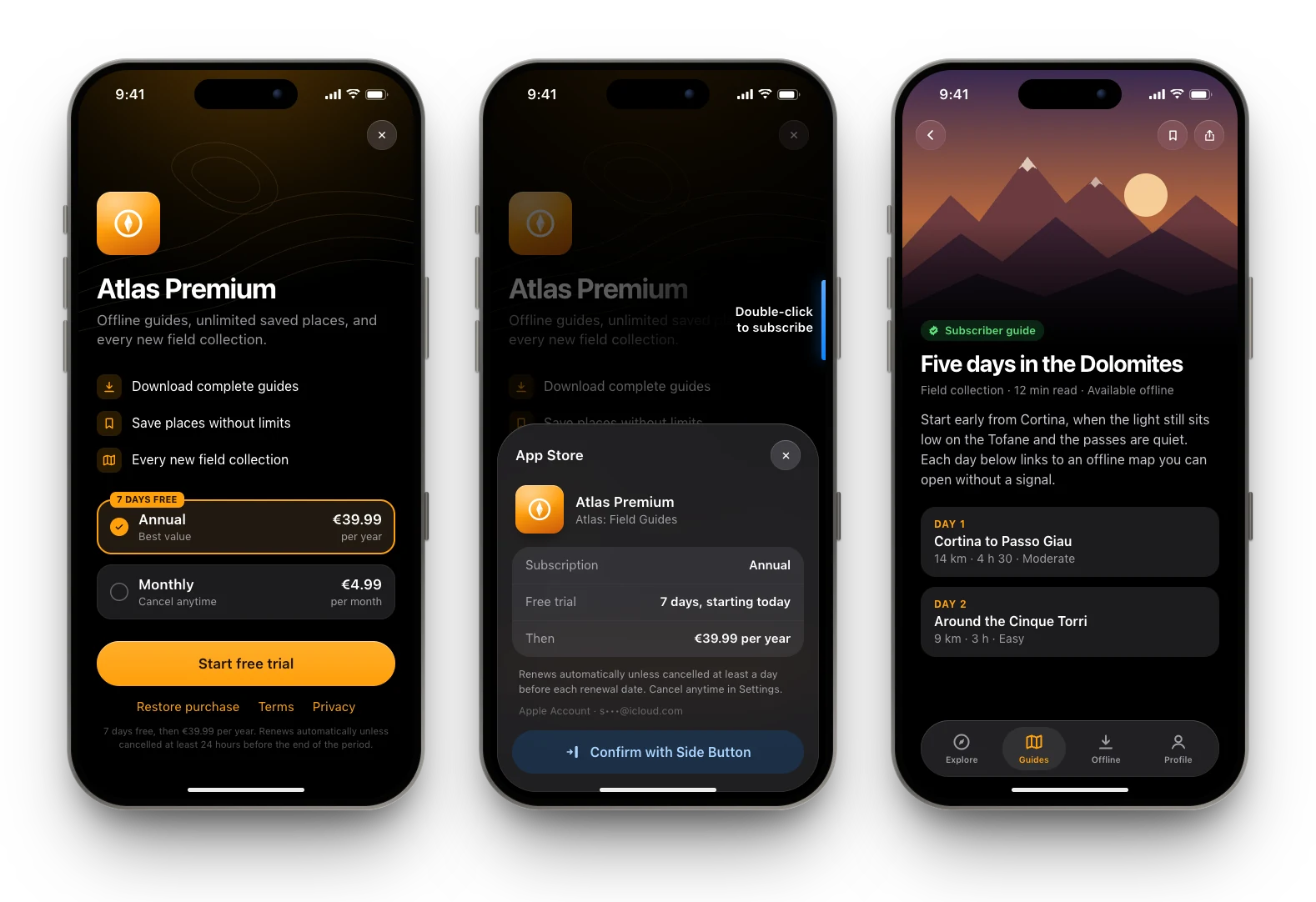
Before, during, and after the payment. After a purchase, the page simply closes and the reader is back on the content, now unlocked.
When things do not go to plan
| What happens | What the reader sees |
|---|---|
| The reader cancels on Apple’s sheet | Nothing: no error message |
| The payment waits for a parent’s approval | The request stays open; if it is approved while the app is running, the purchase carries on |
| Apple’s receipt is missing | The app asks Apple for a fresh one, once |
| A second payment starts while one is running | It is refused |
| The subscription belongs to another account | Restore does not move it, and says it cannot be restored |
| The server check fails after paying | An error; “Restore purchase” brings the subscription back |
Trade-offs
- Apple is told the payment is handled before the server has checked it. This keeps Apple’s queue clean, but if the server check then fails, the reader has paid and sees an error. “Restore purchase” is the way back.
- One shared service means more recovery code in one place. In return, no screen reads Apple’s payment data or makes its own access decisions.
- Built in 2021 on the original StoreKit, with receipts and a payment queue. Only Apple’s “Manage subscriptions” sheet uses the newer API.
History
- Rewritten in plain language.
- Published