# Decoding Images at the Size They Are Shown
> Why small thumbnails filled memory in GoodBarber apps, and how the shared image loader now decodes each image at the size it appears on screen, while every existing screen keeps loading images as before.
- Context: GoodBarber · Platform
- Published: 2026-06-10 · Updated: 2026-09-29
- Reading time: 6 min
- Canonical: https://lanfranchistephane.dev/articles/image-memory/
## System at a glance
1. Size on screen — View size times the screen scale
2. Cache lookup — Image address plus size
3. Original file — From disk, or downloaded
4. Small decode — ImageIO fits it to the size
5. On screen — Only the small copy stays in memory
## At a glance
- Role: iOS engineer who traced the memory growth, added display-sized decoding to the shared image loader, and moved the Search screen to it.
- Challenge: Stop small thumbnails from keeping full-size images in memory, without changing how any existing screen loads its images.
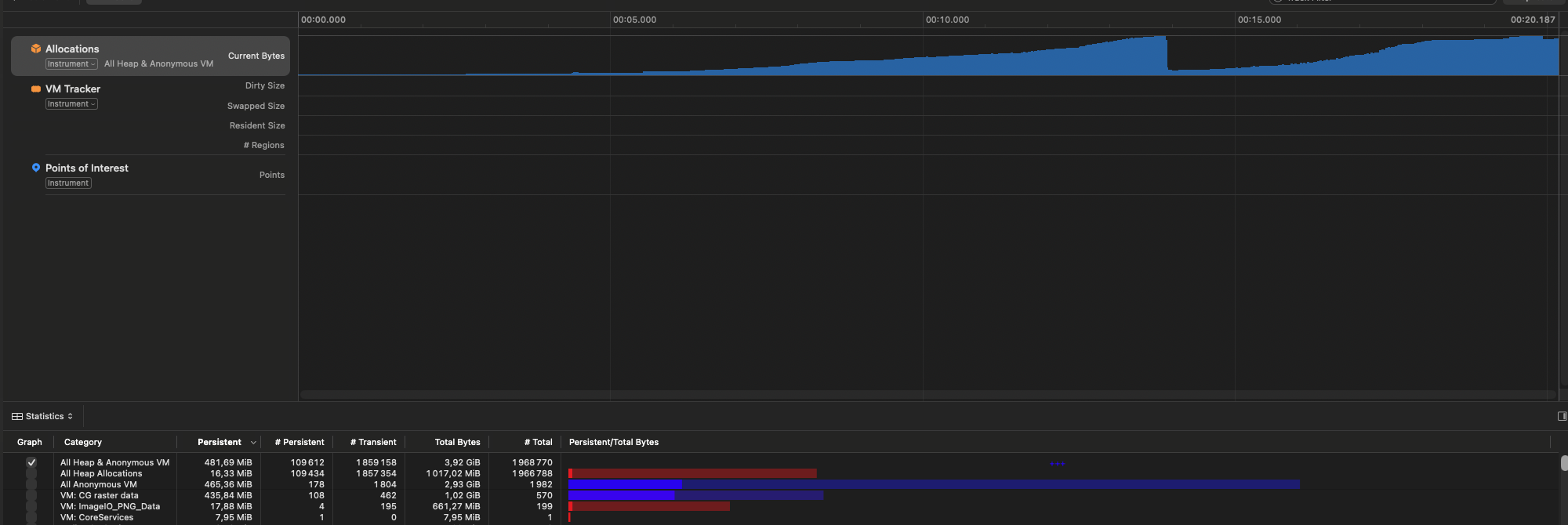
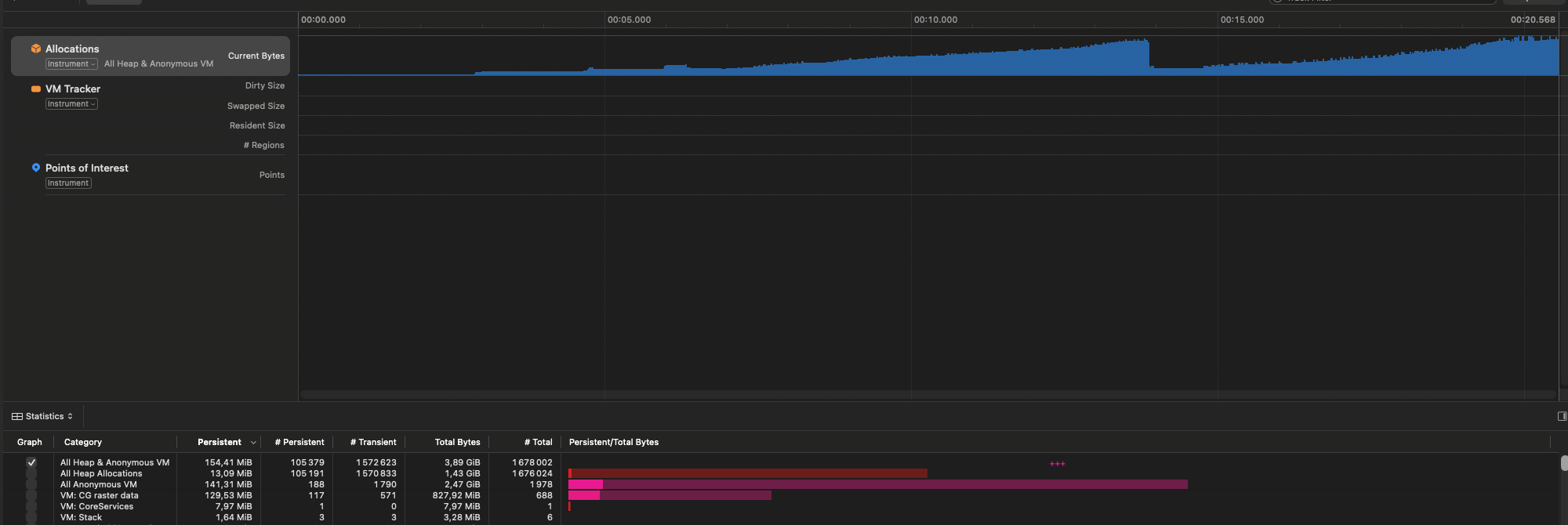
- Outcome: In a test app, memory still in use after about twenty seconds of scrolling fell from 481.69 MiB to 154.41 MiB. Article results in Search use it first.
## What was at stake
### Small thumbnails were keeping full-size images in memory.
GoodBarber builds thousands of iOS apps from one engine. Their lists, galleries, and search results all load images through one shared image loader: an in-house copy of an older version of the open-source SDWebImage library.
That loader decoded every image at its full size, whatever size it was shown at. It then kept the decoded copy in a memory cache with no size limit, emptied only when iOS warns the app that memory is low. On the Search screen, testers saw memory climb steadily as they searched, and never level off.
**My responsibility — the change, from diagnosis to the first screen.** I traced the growth to the size at which images were decoded, added display-sized decoding to the shared loader, built a small test app to measure it, and moved the article results in Search to it.
## Why a small image can cost a lot
An image file is compressed, on the server and on disk. To draw it, iOS first decodes it into raw pixels, and the loader stores four bytes per pixel. So the memory an image takes depends on its pixel dimensions, not on the size of its file or of the view that shows it.
A 750 × 750 pixel image, for example, takes 2.25 MB once decoded. Shown as a 60-point thumbnail on a 3× screen, it only needs 180 × 180 pixels: about 130 KB. Before this change, the loader decoded and cached the full-size version, whatever the thumbnail.
## Tell the loader the size
The fix starts with the screen, because only the screen knows how big an image will be. A screen can now send that size, in pixels, with its request. Search reads the thumbnail's size on screen and multiplies it by the screen scale.
```pseudo title="Work out the size to ask for"
read the thumbnail's size on screen, in points
if it has no size yet:
ask for the full image, as before
otherwise:
multiply it by the screen scale to get pixels
ask for the image at that size
```
A screen that sends no size gets exactly the old behavior. That is what kept the change safe: every existing screen works untouched, and screens can move over one at a time.
## Decode straight to that size
ImageIO, Apple's image decoding framework, can build a small copy directly from the compressed file, without first building the full-size image in memory. You give it the longest side you need. It keeps the proportions and applies the photo's orientation.
```pseudo title="Decode an image for a given size"
if no size was asked for:
decode at full size, as before
if the image is animated:
leave it as it is
if the image already fits in the size:
decode at full size, as before
ask ImageIO for a copy whose longest side fits the size,
keeping the proportions and the photo's orientation
if ImageIO cannot read the file:
decode at full size, as before
```
Each fallback is the old behavior, never a missing image. The approach follows the one newer versions of SDWebImage use.
## One cache entry per size
The same image can appear at two sizes: a small thumbnail in a list, a large picture at the top of an article. They cannot share one cache entry. A small copy stretched over a large picture looks blurry, and a large copy in a list brings the memory problem back. So the cache key is the image's address plus the size asked for.
Memory holds the small decoded copy. The disk holds the original file, under the same key. When iOS frees the memory copy, the next request decodes the file on disk again, at the same size, without downloading it.
## Measuring it
To measure the change on its own, I built a small test app: a list of 292 remote photos shown as 180-point thumbnails, loaded 24 rows at a time as you scroll. A button switches between full-size and display-sized decoding. Each switch empties the memory cache and starts the list again from the top.
I scrolled the list for about twenty seconds in each mode while Instruments, Apple's profiling tool, recorded every memory allocation:
| | Full size | Display size |
|---|---|---|
| Memory still in use at the end | 481.69 MiB | 154.41 MiB |
| Of which, image pixels ("CG raster data") | 435.84 MiB | 129.53 MiB |
| Memory allocated over the whole run | 3.92 GiB | 3.89 GiB |
Memory still in use at the end was 68% lower. The total allocated barely moved: the app does about the same work, but keeps far less of it.
*Full-size decoding: 481.69 MiB still in use at the end of the run.*
*Display-sized decoding: 154.41 MiB. Instruments scales each graph to its own run, so compare the numbers in the tables, not the heights of the graphs.*
This is one run per mode, in a test app. It shows the size of the effect, not what every GoodBarber screen will gain.
## When things do not go to plan
| What happens | What the loader does |
|---|---|
| A screen checks the cache without giving the size | It finds nothing: it must ask with the size it loads with |
| Code edits the image as it arrives | The edit runs on the full image; the result is then redrawn at the smaller size |
| A list row is reused before its image arrives | The old request is cancelled and its image never appears, as before |
## Trade-offs
- **The screen must know the size.** A screen that sends none keeps the old cost. So far only the article results in Search send one; the other kinds of search results, and every other screen, still decode at full size.
- **Checked by measurement, not by automated tests.** The library has no tests of its own; the Instruments runs above are the check.
## Related
- [One Layout Engine for the App's Content Lists](https://lanfranchistephane.dev/articles/layout-engine/) — GoodBarber · Platform, 8 min read. How GoodBarber's list templates got one shared layout: the same code sizes and places a list on the home page and on a full screen, measures each item with the view that draws it, and slots native ads between items.
- [A Real Web Address for Plugin Pages](https://lanfranchistephane.dev/articles/plugin-webviews/) — GoodBarber · Platform, 6 min read. How GoodBarber apps serve an app owner's own web pages from a web server inside the app, forward their calls to other websites, and restart the server after the background.


 *Full-size decoding: 481.69 MiB still in use at the end of the run.*
 *Display-sized decoding: 154.41 MiB. Instruments scales each graph to its own run, so compare the numbers in the tables, not the heights of the graphs.*
This is one run per mode, in a test app. It shows the size of the effect, not what every GoodBarber screen will gain.
## When things do not go to plan
| What happens | What the loader does |
|---|---|
| A screen checks the cache without giving the size | It finds nothing: it must ask with the size it loads with |
| Code edits the image as it arrives | The edit runs on the full image; the result is then redrawn at the smaller size |
| A list row is reused before its image arrives | The old request is cancelled and its image never appears, as before |
## Trade-offs
- **The screen must know the size.** A screen that sends none keeps the old cost. So far only the article results in Search send one; the other kinds of search results, and every other screen, still decode at full size.
- **Checked by measurement, not by automated tests.** The library has no tests of its own; the Instruments runs above are the check.
## Related
- [One Layout Engine for the App's Content Lists](https://lanfranchistephane.dev/articles/layout-engine/) — GoodBarber · Platform, 8 min read. How GoodBarber's list templates got one shared layout: the same code sizes and places a list on the home page and on a full screen, measures each item with the view that draws it, and slots native ads between items.
- [A Real Web Address for Plugin Pages](https://lanfranchistephane.dev/articles/plugin-webviews/) — GoodBarber · Platform, 6 min read. How GoodBarber apps serve an app owner's own web pages from a web server inside the app, forward their calls to other websites, and restart the server after the background.
*Display-sized decoding: 154.41 MiB. Instruments scales each graph to its own run, so compare the numbers in the tables, not the heights of the graphs.*
This is one run per mode, in a test app. It shows the size of the effect, not what every GoodBarber screen will gain.
## When things do not go to plan
| What happens | What the loader does |
|---|---|
| A screen checks the cache without giving the size | It finds nothing: it must ask with the size it loads with |
| Code edits the image as it arrives | The edit runs on the full image; the result is then redrawn at the smaller size |
| A list row is reused before its image arrives | The old request is cancelled and its image never appears, as before |
## Trade-offs
- **The screen must know the size.** A screen that sends none keeps the old cost. So far only the article results in Search send one; the other kinds of search results, and every other screen, still decode at full size.
- **Checked by measurement, not by automated tests.** The library has no tests of its own; the Instruments runs above are the check.
## Related
- [One Layout Engine for the App's Content Lists](https://lanfranchistephane.dev/articles/layout-engine/) — GoodBarber · Platform, 8 min read. How GoodBarber's list templates got one shared layout: the same code sizes and places a list on the home page and on a full screen, measures each item with the view that draws it, and slots native ads between items.
- [A Real Web Address for Plugin Pages](https://lanfranchistephane.dev/articles/plugin-webviews/) — GoodBarber · Platform, 6 min read. How GoodBarber apps serve an app owner's own web pages from a web server inside the app, forward their calls to other websites, and restart the server after the background.